FormField
class FormField
A field that represents a single sub-form.
FormField(
    FormClass: 'type[Form]',
    *,
    required: bool = True,
    default: Any = None
)
Bases: Field
| Argument | Description |
|---|---|
FormClass |
The class of the form to be used as a sub-form. |
required |
Whether the field is required. Defaults to True. |
default |
Default value for the field. Can be a static value or a callable. Defaults to None. |
This is a form field that contains another form as its value. For example:
import formidable as f

class SettingsForm(f.Form):
    locale = f.TextField(default="en_us")
    timezone = f.TextField(default="utc")
    email_notifications = f.BooleanField(default=False)


class Profile(f.Form):
    name = f.TextField(required=False)
    settings = f.FormField(SettingsForm)
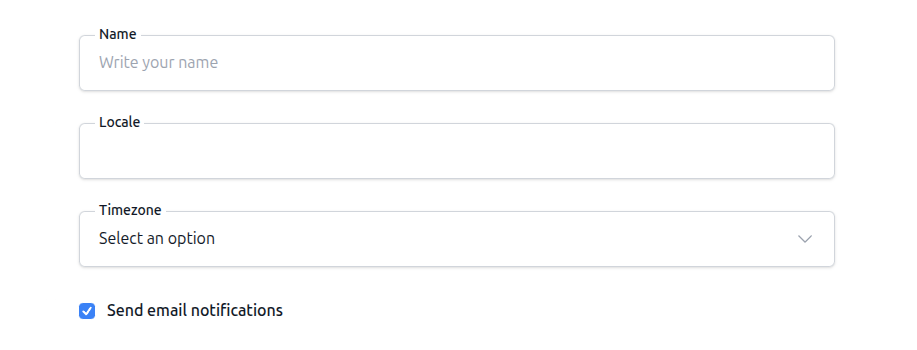
To the user, this will probably look as part of the same form, why bother then? Well, this field isn't about showing the form, it's about how the data is saved.
When saving a form with a FormField, the contents of it comes encapsulated in their own object or dictionary:
print(form.save())

{
  "name": "My name",
  "settings": {
    "locale": "en_us"
    "timezone": "utc",
    "email_notifications": True,
  },
}
This field is useful when you want to store those group of fields separated, for example:
In a different model with a one-to-one relationship to the main model
class Settings(Model):
    locale = Text()
    timezone = Text()
    email_notifications = Bool()

class Profile(Model):
    name = Text()
    settings = ForeignKey(Settings, backref="profile", lazy_load=True)
- or -
In a JSON field, that you want to validate before saving.
class Profile(Model):
    name = Text()
    settings = JSON()